|
|

|
|
|
|
|
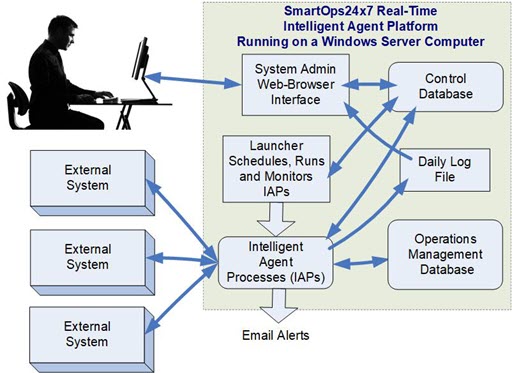
IAPs are launched and run under the control of a Launcher process, which runs continuously, typically as a Windows Service. This is so that the Launcher will be automatically started in the event of a power failure or a processor reboot.
The Launcher process takes its IAP scheduling information from the MilramX Control database. This specifies how often the IAP is to be run, between which hours, whether it is to retrieve all the specified data available or just the latest updates, and whether the IAP is to be run once or periodically.
MilramX is designed to be run on a multi-thread/multi-core computer, which can support the execution of multiple IAPs in parallel, as well as software such as the IIS webserver and SQL Server.
When MilramX is installed and configured, the number of IAPs which can be run at the same time is configured, depending on the number of available cores. This is normally one IAP at a time for 6 cores or less but can extend to running 8 or more IAPs in parallel on multi-core processors, such as Intel i9 and AMD Ryzex 9 processors.
The Launcher runs in a loop, typically with a ten second delay, between loops.
On each loop, the Launcher:
When an IAP finishes its assigned task, such as moving updated data from one system to another, it terminates its own process. Thereby freeing up the computer resources used by the IAP. And, if the IAP does not terminate itself within a designated time, the Launcher terminates the process.
This enables MilramX to keep scheduling IAPs 24x7 even though a IAP may hang or not perform correctly.
In addition to the databases or systems that the system is configured to grant access to the IAP, the IAPs have access to the Control database, where additional information, such as character set transformation information is kept. IAPs also have access to a daily log file where errors and warnings are logged.
MilramX comes with a web-browser interface through which the scheduling data in the Control file can be updated. This interface also gives access to the status of the IAPs including any error or warning messages they generate.
If the Launcher or any IAP or the DLLs generate error messages these are logged in the daily log file and can also be sent as an Email alert to an IT person. The IT person can then come in remotely through the Sys Admin browser screen and have full access to the log file, the error and warning messages generated, as they will to the databases (in HLDO format.) This is to allow diagnosis and correction of data access and information exchange issues, without shutting down MilramX.
Please click here to learn more about Why use Intelligent Agents?
| User Manuals | About MilramX | Data Sheets | Background |
Copyright © SmartOpsMgt LLC 2026