|
|

|
|
|
|
|
The Tau Adaptor uses a specific format, as shown here, for importing and exporting HLDO instance data, in this example for BellHawk location data.
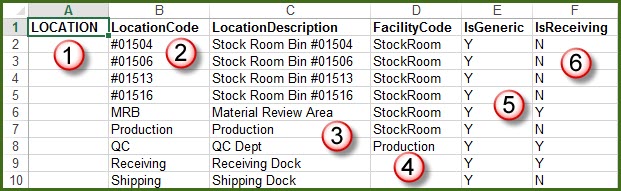
This format can be used for importing and exporting data in Excel spreadsheet format through the system administrator's DEXEL screen as well as the staff Setup screen in BellHawk.
The spreadsheet has a header row followed by rows describing each of the data object instances.
The header row contains a keyword, in this case LOCATION (1) that identifies the type of data object.
This is followed by column headers (2), (3), (4), (5), (6) etc. that must be spelled exactly as exported, as they are used by the import routine to identify what data is in each column.
So, if you are exporting an object type to use as a template for setting up and importing a specific data type, do not modify the header row in any way. Formally, the keyword is the unique name that identifies the HLDO (High Level Data Object) and the column headers are the HLDO parameters.
If, on export, there is no data already in the database for the type of object you exported then there will just be the header row in the export file. You can now edit this file and add or modify rows and then use the Import button to import the resultant setup data into your BellHawk system.
The first column should be blank unless you want to mark an existing entry as deleted, when you place a "D" in that column to mark that entry as to be marked as deleted in the database table when the Excel file is imported. Also you can place a "#" (by itself) in the first column if you want to use the rest of the fields on that line as a comment.
At time of initial startup, there will be no initial object instances for most data objects. For others, such as item categories, there may be some initialization values that are used by BellHawk itself. Please do not delete or modify these as they may cause your BellHawk system to no longer work correctly.
When importing data, any columns, except the first (Keyword) column, may be omitted, if they contain optional data items. These columns may also appear in any order, as they are recognized by their column header. But columns that uniquely identify an entry, such as the Location Code, must be included. The HLDO Keyword and the column header entries are case sensitive.
Please click here to learn how Tau Adaptor Principles are used for Web Services Interfaces.
| TauAdaptor | HLDOs | Sample Code | Adaptors | Web Services |
Copyright © SmartOpsMgt LLC 2026